Catalog & discovery
Plan categories, navigation and filters around the catalog you actually have. Product data quality and naming affect the experience before styling begins.
ECOMMERCE WEB DESIGN / FROM PRODUCT TO PURCHASE
A store needs more than a striking homepage. Customers must find a product, understand the options and feel clear about delivery and checkout. We design ecommerce storefronts and redesign existing stores around those connected decisions.
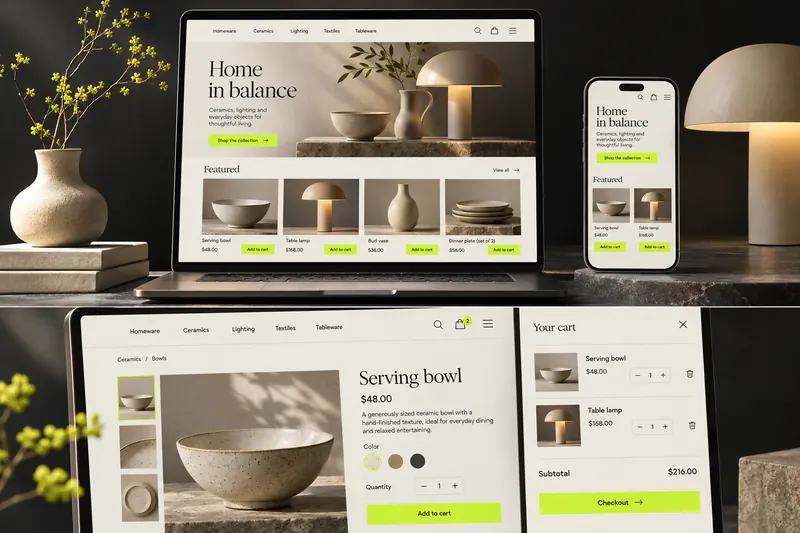
Start with one category, one product with variants, and one path from product page to purchase. Decide what needs to change at each step and which parts of the existing platform can stay.
A product-page update might need clearer photos, stock and delivery information. A catalog rework also needs consistent product data, navigation, filters and checks for changed URLs. Payment, tax and inventory integrations require their own scope and test plan.
Share your platform, approximate catalog size, and the part of the shopping journey you want to fix first.
See how we scope targeted performance fixesThe scope
Plan categories, navigation and filters around the catalog you actually have. Product data quality and naming affect the experience before styling begins.
Give images, variants, pricing, delivery and returns information a useful order. The page should answer the questions a shopper needs resolved before adding to cart.
Review cart feedback and the platform's checkout route. Payment, tax, shipping and fulfillment dependencies require explicit scope and safe test arrangements.
A considered process
The working detail
Use these questions to prepare a more useful brief and compare the work behind a proposal.
A shopper comparing ceramic mugs needs different information from someone buying an industrial replacement part. Start by listing what customers use to decide: dimensions, compatibility, materials, delivery time, care instructions or a sample they can see in person. Group products by those decisions. Keep internal product names where useful but explain them with customer language. Review how shoppers reach a product from the homepage, a category, a search result and a direct link. Each route needs enough context for the person to understand the item without starting at the top of the store.
Decide which attributes should appear in navigation, which belong in filters and which are better left as product details. A small catalog may need a few clear collections. A larger catalog needs consistent data before a filter system can work reliably. Check how missing values, discontinued products and variants will be handled. Review the names of categories and labels with someone unfamiliar with your inventory. Ask that person to find a specific item without assistance. Use the results to identify ambiguous terminology and decide which questions the collection page should answer before users visit a product.
Give each product a clear name and a useful description. Show images that reveal size, finish or detail, and pair them with accurate alt text where the image conveys information. For products with variants, make it obvious which selection changes the price, availability or delivery options. Clarify whether a pictured accessory is included. Put specifications and returns information where shoppers can find them before committing. Avoid burying an essential detail in an image that cannot be read on a phone. Test at least one ordinary product and one complex product with variations to expose cases the main template must support.
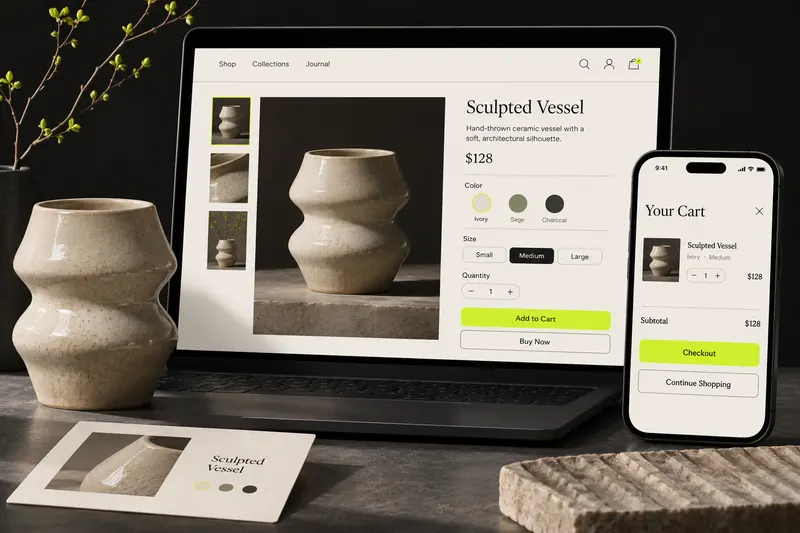
Review cart totals, shipping expectations, discount handling and the states visitors see when inventory changes. A checkout is often provided by the store platform, so decide which parts can be styled and which use standard screens. Test a normal order and foreseeable failure states in the approved environment. Use the store’s test mode where available. Check what the customer receives and how the order appears in the administration view. Assign an owner for any integration with fulfillment, payments or notifications. The site is easier to operate when the store team knows how to resolve an exception.
Keep useful product and collection URLs where the platform allows. If URLs change, match old pages to relevant replacements. Check whether discontinued items should remain as useful references, link to a replacement or return a missing status. Define consistent treatment for variant and filtered URLs. Review internal links and sitemap entries on the finished store. Images, product copy and links should refer to the items that are actually available. Preserve useful customer information such as care instructions and compatibility notes when consolidating old listings, even if the new design presents that material in a different way.
Before comparing tools, list how the store handles products, taxes, fulfillment, inventory and returns. Identify requirements such as wholesale pricing, subscriptions or syncing stock with an offline location. Clarify which of these are launch requirements. Then decide who owns the store account, pays for extensions and can change templates. Avoid platform decisions based only on an attractive demo. Ask the person who manages orders to walk through a typical update and a return. Include their feedback in the decision because their daily work matters long after the design has been approved.
A budget-conscious first phase may focus on a small catalog, reusable product and collection layouts and a tested checkout. If the current store works, improvements to the top collections and product templates may be enough to solve an immediate problem. Save optional features such as advanced filters and custom account tools for later if they do not affect launch. Give us a product export or a representative list of products and variations. Identify how often the catalog changes and which integrations you need. Those details make the first conversation about the actual store and the team that will operate it.
Agree how a staff member adds a product, edits a stock message and updates a category after launch. Provide a few representative records for review and identify any bulk operations you need. Make a short reference for image sizes, product naming and where returns information is maintained. Confirm access to store administration, billing and integrations. Agree which issues belong with the store owner and which need development support. If you compare results after launch, evaluate visits to product pages, the steps customers take before checkout and the operational quality of received orders. Keep those measures separate so you can diagnose problems accurately.
Send the existing store URL, the number of products, a few typical variants and any tools you want to keep. List the markets you ship to and who handles fulfillment. Share one common customer question and one recurring operational problem. A team that struggles to update product availability needs a different project than a store that mainly needs clearer product pages. If you have a launch date, say what makes it fixed and which features could wait. Give the reviewer an example of a product that is particularly hard to explain so the proposal can account for the edge case.
Select three products that represent your catalog: a straightforward item, one with several variants and one that needs more explanation. Gather the actual descriptions, photos, stock states and shipping details for each. Use this small set to test whether a template can support the range of information. If an item requires a compatibility table, care instructions or a downloadable specification, decide where those details belong before importing the catalog. Ask the owner of product data to review the labels. This avoids building the whole store around sample content that does not match what customers will see.
Questions & answers
Potentially. Share the platform, theme, catalog size and integrations. A review establishes whether the work is a storefront refresh, a template rebuild or a more involved migration.
That cannot be promised. We can identify confusing product and shopping flows, implement the agreed changes and define what to measure. Demand, product economics and operations also affect revenue.
They are listed separately where needed. Confirm the payment provider, shipping rules and fulfillment tools before the quote. Testing should use an agreed safe environment and avoid unintended real charges or orders.
Enquiry sent
Thanks for sharing your project with us. We’ll reply to the business email address you provided.
Prefer a direct line?